
LogicHub
LogicHub
Security Platform UX
Security Platform UX
Security Workflow Automation
Product UX/UI
Overview
Designing a Humanized Input in a Security Automation Platform
LogicHub’s “Ask for User Input” feature was a workflow automation experience that allowed a flow author to pause an automated process, request input from a human user, collect a response through a generated form, and continue the workflow based on that response. I designed the UX framework, mental model, configuration flow, email/form experience, response handler, and status-tracking patterns for a feature that anticipated the human-in-the-loop workflow creation patterns common in modern automation tools today.

The Challenge
Automation platforms are powerful when every decision can be handled by data, rules, or integrations. But many real security and operations workflows still require a human decision at the right moment: approve an action, confirm a reset, provide missing context, choose an option, or supply sensitive input.
The challenge was to design a workflow-builder feature that could bring human input into an automated flow without breaking the flow author’s mental model. The experience needed to help authors define what to ask, who to ask, how to ask it, what data to pass into the request, how to capture the response, and what the workflow should do next.
What I Did
Mental Model & Flow Design:
Defined the end-to-end model: Ask for input → Receive response → Do something else. This became the conceptual foundation for the feature.

Workflow Builder UX:
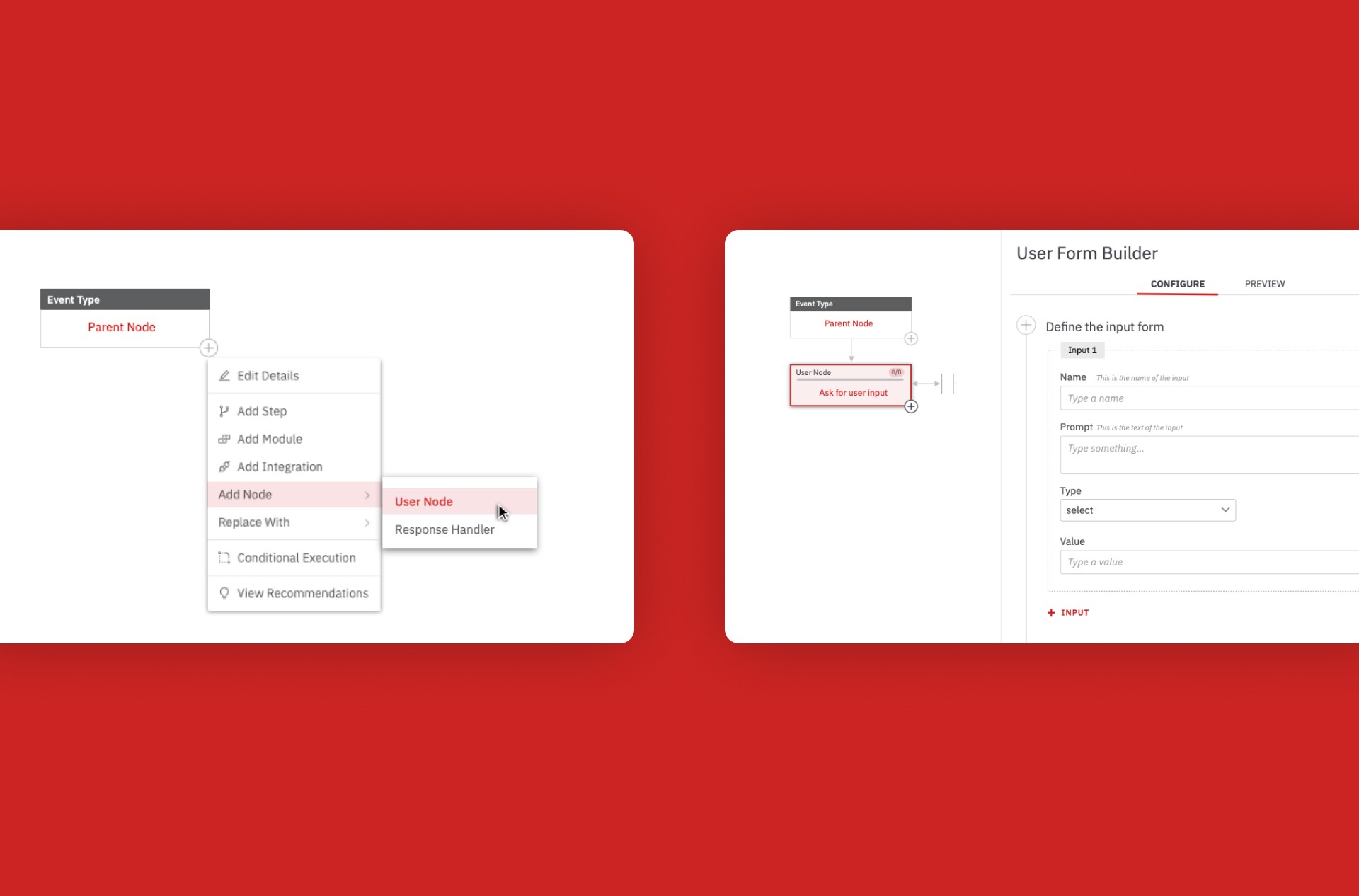
Designed how a flow author adds an “Ask for user input” node into an existing automation canvas, configures it, and connects it to a response handler.
Variable System:
Created the UX for defining request variables from parent data columns, previewing values, and inserting variables like
{ username }
and
{ form-url }
into prompts and email templates.
Form Builder:
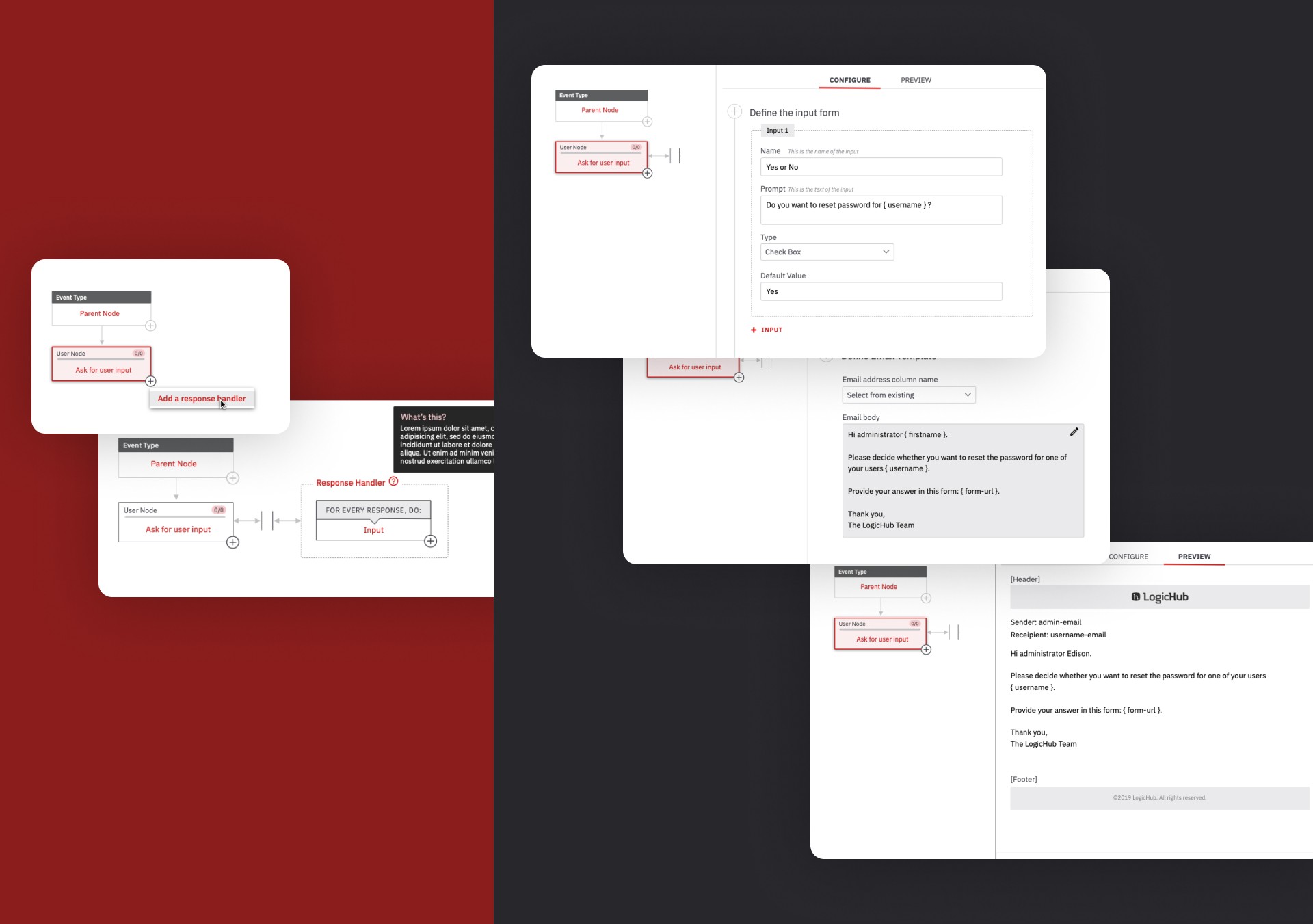
Designed the configuration flow for building input forms with fields, prompts, input types, values, previews, and multiple inputs.
Email, Response & Monitoring UX:
Email template setup, response handler logic, status monitoring, and backend-aware UX mapping into one connected experience so authors could send requests, capture responses, track execution, and recover from failures.
Design System:
Defined reusable patterns for workflow nodes, configuration panels, form fields, variables, previews, response states, and status indicators so the feature could scale consistently across the automation builder.
Key Decisions
Make the workflow understandable as a loop.
The feature was not just a form builder. It was a loop inside an automation: request, response, action, and status. The mental model helped authors understand where the human decision fit inside the system.
Separate authoring from responding.
The UX clearly separated the flow author experience from the analyst/end-user experience. Authors configured requests and handlers; users received a simple email, opened a form, submitted input, and received confirmation.
Use variables to make requests contextual.
Variables allowed forms and emails to feel specific to each workflow row or event. Instead of sending generic prompts, the system could generate contextual requests such as asking whether to reset a password for a specific user.
Treat human input as workflow data.
The response handler made the user’s answer usable by the automation, turning a human decision into structured data that downstream nodes could process.
Expose technical limits as clear product rules.
Backend constraints such as one response handler, one submission per form, form expiration, email throttling, and parameter limits were translated into a simpler UX so authors understood what the system could safely support.
Core Product Loop
Define — The flow author defines request variables from existing workflow data.
Configure — The author builds the input form, field types, prompts, and values.
Notify — The system sends an email with a generated form link to the recipient.
Respond — The end user submits the requested input through the form.
Handle — The response handler maps the returned data into the workflow.
Act — Downstream nodes execute based on the response.
Monitor — The author tracks sent, awaiting, received, executed, failed, and resend states.
Results
Created a complete UX framework for human-in-the-loop workflow automation.
Defined a clear authoring model for request variables, input forms, email templates, and response handlers.
Connected end-user form submission back into automated workflow execution.
Improved transparency with status tracking for sent, awaiting input, received, executed, failed, and resend states.
Established a reusable pattern for asynchronous workflow approvals and user-provided data.
Helped make complex security automation more practical by allowing human judgment to enter the workflow at the right point.
Aligned UX decisions with backend requirements for form persistence, URL expiration, row-level execution, stored results, retry behavior, and one-handler workflow simplicity.
The strongest design challenge was making a complex automation concept feel simple. A flow author needed to understand both sides of the experience: the system sending a request and the human providing the answer. By breaking the feature into variables, form configuration, email preview, response handling, and status monitoring, the design turned human input into a structured part of the workflow.
Looking back, this work anticipated many of the human-in-the-loop patterns that now define modern workflow builders and AI automation products.
LogicHub
Security Platform UX
Security Workflow Automation
Product UX/UI
Overview
Designing a Humanized Input in a Security Automation Platform
LogicHub’s “Ask for User Input” feature was a workflow automation experience that allowed a flow author to pause an automated process, request input from a human user, collect a response through a generated form, and continue the workflow based on that response. I designed the UX framework, mental model, configuration flow, email/form experience, response handler, and status-tracking patterns for a feature that anticipated the human-in-the-loop workflow creation patterns common in modern automation tools today.
The Challenge
Automation platforms are powerful when every decision can be handled by data, rules, or integrations. But many real security and operations workflows still require a human decision at the right moment: approve an action, confirm a reset, provide missing context, choose an option, or supply sensitive input.
The challenge was to design a workflow-builder feature that could bring human input into an automated flow without breaking the flow author’s mental model. The experience needed to help authors define what to ask, who to ask, how to ask it, what data to pass into the request, how to capture the response, and what the workflow should do next.
What I Did
Mental Model & Flow Design:
Defined the end-to-end model: Ask for input → Receive response → Do something else. This became the conceptual foundation for the feature.
Workflow Builder UX:
Designed how a flow author adds an “Ask for user input” node into an existing automation canvas, configures it, and connects it to a response handler.
Variable System:
Created the UX for defining request variables from parent data columns, previewing values, and inserting variables like
{ username }
and
{ form-url }
into prompts and email templates.
Form Builder:
Designed the configuration flow for building input forms with fields, prompts, input types, values, previews, and multiple inputs.
Email, Response & Monitoring UX:
Email template setup, response handler logic, status monitoring, and backend-aware UX mapping into one connected experience so authors could send requests, capture responses, track execution, and recover from failures.
Design System:
Defined reusable patterns for workflow nodes, configuration panels, form fields, variables, previews, response states, and status indicators so the feature could scale consistently across the automation builder.
Key Decisions
Make the workflow understandable as a loop.
The feature was not just a form builder. It was a loop inside an automation: request, response, action, and status. The mental model helped authors understand where the human decision fit inside the system.
Separate authoring from responding.
The UX clearly separated the flow author experience from the analyst/end-user experience. Authors configured requests and handlers; users received a simple email, opened a form, submitted input, and received confirmation.
Use variables to make requests contextual.
Variables allowed forms and emails to feel specific to each workflow row or event. Instead of sending generic prompts, the system could generate contextual requests such as asking whether to reset a password for a specific user.
Treat human input as workflow data.
The response handler made the user’s answer usable by the automation, turning a human decision into structured data that downstream nodes could process.
Expose technical limits as clear product rules.
Backend constraints such as one response handler, one submission per form, form expiration, email throttling, and parameter limits were translated into a simpler UX so authors understood what the system could safely support.
Core Product Loop
Define — The flow author defines request variables from existing workflow data.
Configure — The author builds the input form, field types, prompts, and values.
Notify — The system sends an email with a generated form link to the recipient.
Respond — The end user submits the requested input through the form.
Handle — The response handler maps the returned data into the workflow.
Act — Downstream nodes execute based on the response.
Monitor — The author tracks sent, awaiting, received, executed, failed, and resend states.
Results
Created a complete UX framework for human-in-the-loop workflow automation.
Defined a clear authoring model for request variables, input forms, email templates, and response handlers.
Connected end-user form submission back into automated workflow execution.
Improved transparency with status tracking for sent, awaiting input, received, executed, failed, and resend states.
Established a reusable pattern for asynchronous workflow approvals and user-provided data.
Helped make complex security automation more practical by allowing human judgment to enter the workflow at the right point.
Aligned UX decisions with backend requirements for form persistence, URL expiration, row-level execution, stored results, retry behavior, and one-handler workflow simplicity.
The strongest design challenge was making a complex automation concept feel simple. A flow author needed to understand both sides of the experience: the system sending a request and the human providing the answer. By breaking the feature into variables, form configuration, email preview, response handling, and status monitoring, the design turned human input into a structured part of the workflow.
Looking back, this work anticipated many of the human-in-the-loop patterns that now define modern workflow builders and AI automation products.
LogicHub
Security Platform UX
Security Workflow Automation
Product UX/UI
Overview
Designing a Humanized Input in a Security Automation Platform
LogicHub’s “Ask for User Input” feature was a workflow automation experience that allowed a flow author to pause an automated process, request input from a human user, collect a response through a generated form, and continue the workflow based on that response. I designed the UX framework, mental model, configuration flow, email/form experience, response handler, and status-tracking patterns for a feature that anticipated the human-in-the-loop workflow creation patterns common in modern automation tools today.
The Challenge
Automation platforms are powerful when every decision can be handled by data, rules, or integrations. But many real security and operations workflows still require a human decision at the right moment: approve an action, confirm a reset, provide missing context, choose an option, or supply sensitive input.
The challenge was to design a workflow-builder feature that could bring human input into an automated flow without breaking the flow author’s mental model. The experience needed to help authors define what to ask, who to ask, how to ask it, what data to pass into the request, how to capture the response, and what the workflow should do next.
What I Did
Mental Model & Flow Design:
Defined the end-to-end model: Ask for input → Receive response → Do something else. This became the conceptual foundation for the feature.
Workflow Builder UX:
Designed how a flow author adds an “Ask for user input” node into an existing automation canvas, configures it, and connects it to a response handler.
Variable System:
Created the UX for defining request variables from parent data columns, previewing values, and inserting variables like
{ username }
and
{ form-url }
into prompts and email templates.
Form Builder:
Designed the configuration flow for building input forms with fields, prompts, input types, values, previews, and multiple inputs.
Email, Response & Monitoring UX:
Email template setup, response handler logic, status monitoring, and backend-aware UX mapping into one connected experience so authors could send requests, capture responses, track execution, and recover from failures.
Design System:
Defined reusable patterns for workflow nodes, configuration panels, form fields, variables, previews, response states, and status indicators so the feature could scale consistently across the automation builder.
Key Decisions
Make the workflow understandable as a loop.
The feature was not just a form builder. It was a loop inside an automation: request, response, action, and status. The mental model helped authors understand where the human decision fit inside the system.
Separate authoring from responding.
The UX clearly separated the flow author experience from the analyst/end-user experience. Authors configured requests and handlers; users received a simple email, opened a form, submitted input, and received confirmation.
Use variables to make requests contextual.
Variables allowed forms and emails to feel specific to each workflow row or event. Instead of sending generic prompts, the system could generate contextual requests such as asking whether to reset a password for a specific user.
Treat human input as workflow data.
The response handler made the user’s answer usable by the automation, turning a human decision into structured data that downstream nodes could process.
Expose technical limits as clear product rules.
Backend constraints such as one response handler, one submission per form, form expiration, email throttling, and parameter limits were translated into a simpler UX so authors understood what the system could safely support.
Core Product Loop
Define — The flow author defines request variables from existing workflow data.
Configure — The author builds the input form, field types, prompts, and values.
Notify — The system sends an email with a generated form link to the recipient.
Respond — The end user submits the requested input through the form.
Handle — The response handler maps the returned data into the workflow.
Act — Downstream nodes execute based on the response.
Monitor — The author tracks sent, awaiting, received, executed, failed, and resend states.
Results
Created a complete UX framework for human-in-the-loop workflow automation.
Defined a clear authoring model for request variables, input forms, email templates, and response handlers.
Connected end-user form submission back into automated workflow execution.
Improved transparency with status tracking for sent, awaiting input, received, executed, failed, and resend states.
Established a reusable pattern for asynchronous workflow approvals and user-provided data.
Helped make complex security automation more practical by allowing human judgment to enter the workflow at the right point.
Aligned UX decisions with backend requirements for form persistence, URL expiration, row-level execution, stored results, retry behavior, and one-handler workflow simplicity.
The strongest design challenge was making a complex automation concept feel simple. A flow author needed to understand both sides of the experience: the system sending a request and the human providing the answer. By breaking the feature into variables, form configuration, email preview, response handling, and status monitoring, the design turned human input into a structured part of the workflow.
Looking back, this work anticipated many of the human-in-the-loop patterns that now define modern workflow builders and AI automation products.